Accounting AI Helper for Finance Teams: Workflows, Controls and Pilots
Listen to article
11:09
An accounting AI helper is software that suggests, drafts or performs accounting tasks such as transaction coding, bank matching and accrual suggestions. Many tools that appear for this search are homework solvers that explain textbook problems. A finance team needs something different: an assistant that works on real ledger data, sends exceptions to reviewers and keeps an audit trail. This guide shows how to choose a workflow, verify the output and pilot it with controlled permissions.

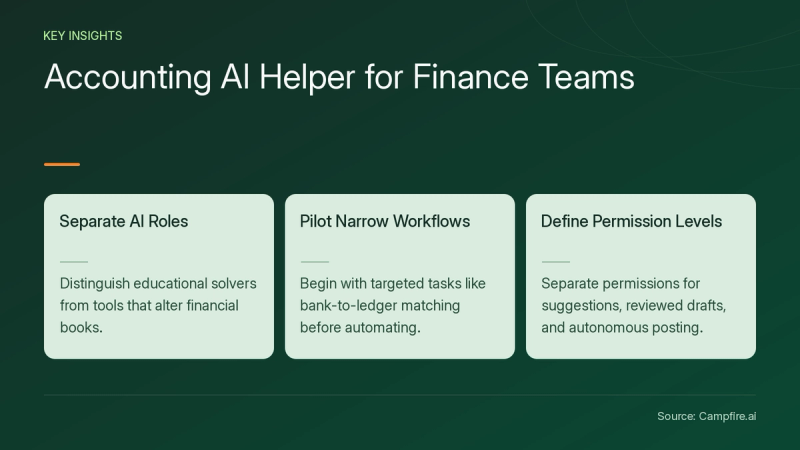
Key Takeaways
- Separate educational solvers from assistants that read or change your books. They carry different risks.
- Start with one narrow workflow, such as bank-to-ledger matching, before you consider broad automation.
- Treat every AI answer as a draft. Recompute the numbers, trace them to source records and record the reviewer's decision.
- Evaluate suggestions, reviewed drafts and autonomous posting as three separate permission levels.
- Budget for data cleanup, training and review time as well as license cost.
What Is an Accounting AI Helper?
An accounting AI helper is any AI tool that supports accounting work, and what it can touch depends on its type. The table below compares three common categories by task, data access and permissions.
| Type | Typical tasks | Data it uses | Can it change the books? |
|---|---|---|---|
| Educational solver | Typical tasksExplains journal entries, ratios and present value problems | Data it usesQuestions you type or upload | Can it change the books?No |
| Spreadsheet assistant | Typical tasksMatches tables, flags duplicates, drafts formulas | Data it usesExported files | Can it change the books?No. Results must be re-entered. |
| Accounting-system assistant | Typical tasksCodes transactions, matches bank feeds, proposes accruals | Data it usesLive ledger and connected feeds | Can it change the books?Depends on configured approval rules |
Accounting-system assistants need the closest scrutiny because they work inside the ledger. Campfire's Accounting Intelligence for transaction matching and categorization is one example. It proposes coding for uncategorized transactions, matches bank transactions to GL entries, flags duplicates and surfaces accrual suggestions that you review and post. Each action is attributed in an audit trail.
How Does an Accounting AI Helper Handle a Bank Reconciliation?
The helper compares two record sets, proposes matches and sends anything uncertain to a human. The walkthrough below uses synthetic data and is hypothetical.
Step 1: Prepare the source data
Confirm that both data sets are complete and comparable before matching starts. Check these items:
- The bank export covers the full period and ties to the statement's closing balance.
- Dates and sign conventions are consistent across both files.
- Duplicate rows created by overlapping exports have been removed.
- Ledger lines map to the correct cash account.
If data preparation reveals larger chart-of-accounts problems, review Campfire's implementation and migration services before you scope the pilot.
Step 2: Review matches and exceptions
A useful helper sorts results into confident matches, possible matches and unmatched items.


| Bank line | Ledger line | Helper result | Reviewer action |
|---|---|---|---|
| Mar 3, ACH -$4,287.00 | Ledger lineMar 3, Vendor A -$4,287.00 | Helper resultMatched | Reviewer actionApprove |
| Mar 7, Wire -$1,240.00 | Ledger lineMar 5, Vendor B -$1,240.00 (entered twice) | Helper resultPossible match plus duplicate flag | Reviewer actionVoid the duplicate, then approve |
| Mar 12, Fee -$35.00 | Ledger lineNone | Helper resultUnmatched | Reviewer actionBook the bank fee with support attached |
Step 3: Sign off and retain evidence
The reviewer approves each match, documents how each exception was resolved and keeps the source files. Before closing, the reconciled balance should equal the statement balance less reconciling items.
How Do You Verify AI Accounting Output?
Recompute every number independently and trace each conclusion to a source record before you approve it. A clear explanation does not prove the answer is right. A 2025 CPA Journal article testing ChatGPT on accounting scenarios[c1] noted that AI may give unclear or inaccurate answers, or hallucinate facts, when it lacks context, which makes human interpretation necessary.
Rounding is a simple example. Take a hypothetical project with cash flows of $2,000, $800 and $1,000 over three years at a 10% discount rate:
- With rounded discount factors (0.909, 0.826, 0.751), the present value is $3,229.80.
- At full precision (2000/1.1 + 800/1.1² + 1000/1.1³), it is $3,230.65.
An $0.85 gap is small, but repeated across many schedules the differences add up. Use this checklist:
- Source completeness: Was every relevant record included?
- Arithmetic: Do totals recompute in a spreadsheet?
- Policy assumptions: Does the treatment follow your capitalization, accrual and revenue policies?
- Unsupported conclusions: Is every claim backed by a document?
- Escalation: Does anything over your materiality threshold go to a senior reviewer?
Technical conclusions need the same discipline. This guide to AI tools for accountants[c2] warns that AI can produce plausible but incorrect accounting conclusions and advises verifying against primary sources.


Which Controls Should You Require Before Granting Access?
Require clear permission levels, documented data handling and an activity log before an AI helper connects to your ledger. Compare the three automation levels separately.
| Level | What the AI does | Who posts | Key control |
|---|---|---|---|
| Suggestion | What the AI doesRecommends coding or matches | Who postsAccountant | Key controlReviewer edits are logged |
| Reviewed draft | What the AI doesPrepares the entry for approval | Who postsAccountant approves | Key controlSegregation of duties between preparer and approver |
| Autonomous posting | What the AI doesPosts within set rules | Who postsSystem | Key controlApproval thresholds and periodic sampling |
Campfire's Accounting Intelligence page says users can set automatic approval thresholds for any activity or keep manual control. Ask any vendor to show the equivalent settings in a live demo.
Demo checklist
- Pick a flagged transaction and trace it back to its source document.
- Change its classification and confirm the edit is logged with your user ID.
- Test whether an item just above the approval threshold is held for review.
- Ask where data is stored, how long it is retained and whether it is used to train models.
- Confirm that role permissions separate preparers, reviewers and administrators.
Data handling applies to general AI tools too. The same Learnsignal guide advises against entering confidential client information into consumer AI tools without appropriate data processing agreements.
How Do You Run a 30-Day Pilot?
Pick one workflow, measure your current baseline and set acceptance criteria before you turn the AI helper on. The scorecard below is a hypothetical template, not a benchmark.
| Metric | How to measure | Acceptance question |
|---|---|---|
| Setup effort | How to measureHours spent on integration and data mapping | Acceptance questionWas it within the agreed budget? |
| Review minutes | How to measureTime per batch, before and after | Acceptance questionDid reviewer time go down? |
| Correction rate | How to measureSuggestions changed divided by suggestions made | Acceptance questionIs it falling week over week? |
| Exception backlog | How to measureOpen items at period end | Acceptance questionAre items being cleared on time? |
| Evidence completeness | How to measureSample of approvals with source attached | Acceptance questionWould an auditor accept it? |
Roles and budget
- Preparer: runs the workflow and flags anomalies.
- Reviewer: approves outputs and tracks corrections.
- Administrator: manages permissions and thresholds.
- Budget lines: licenses, integration, chart-of-accounts cleanup, training and review hours. Ask each vendor for written pricing that covers all of them.
- Rollback: keep the manual process ready in case acceptance criteria are not met.
Conclusion
An accounting AI helper is useful when it produces work you can review, not just answers that sound right. Start with one reconciliation or coding workflow, clean the source data, recompute outputs independently and log every reviewer decision. Treat suggestions, drafts and autonomous posting as separate permission levels, and price the pilot with cleanup and review time included. Once your scorecard and control checklist are ready, test an AI-native ERP on that controlled workflow and get started with Campfire.
FAQ
Can an accounting AI helper change my books?
It depends on the tool type and your settings. Educational solvers and spreadsheet assistants work on typed questions or exported files, so their results must be entered by a person, while accounting-system assistants may post within approval thresholds you configure, so confirm during a demo which actions need human approval.
What data should I give an AI accounting helper?
Share only approved sources, such as bank exports and ledger detail for a defined period, after confirming the vendor's retention, model-training and access policies and putting appropriate data processing agreements in place. Remove duplicates and confirm the data is complete before you upload it.
How do I know if AI accounting output is correct?
Recompute totals independently, trace each line to a source document, check that the treatment follows your accounting policies and escalate anything above your materiality threshold. A clear explanation alone does not prove the answer is right.
Is an accounting AI solver the same as an AI accounting assistant?
No. Accounting AI solvers explain textbook problems for study purposes, while AI accounting assistants work on business data such as bank feeds and general ledger entries and need permissions, audit trails and reviewer approval.
What does an accounting AI pilot cost?
Total cost includes licenses, integration, data cleanup, training and reviewer time, not just the subscription fee. Request written pricing from each vendor and track internal hours during the pilot so you can compare against your baseline.
Sources
- [c1] How Artificial Intelligence May Impact the Accounting Profession - The CPA Journal — cpajournal.com. Accessed November 13, 2026.
- [c2] AI Tools for Accountants: The Definitive Guide 2026 | Learnsignal — learnsignal.com. Accessed November 13, 2026.