Accounting Automation Examples: 8 Workflows and How to Start Safely
Listen to article
7:06
Common accounting automation examples include receipt capture, invoice matching, bank reconciliation, transaction categorization, duplicate detection, accruals, revenue schedules and close checklists. Each one uses software to handle repetitive, rules-based work while accountants review exceptions. This guide shows what each example automates, which companies have published results, and how to pilot one workflow without losing control.

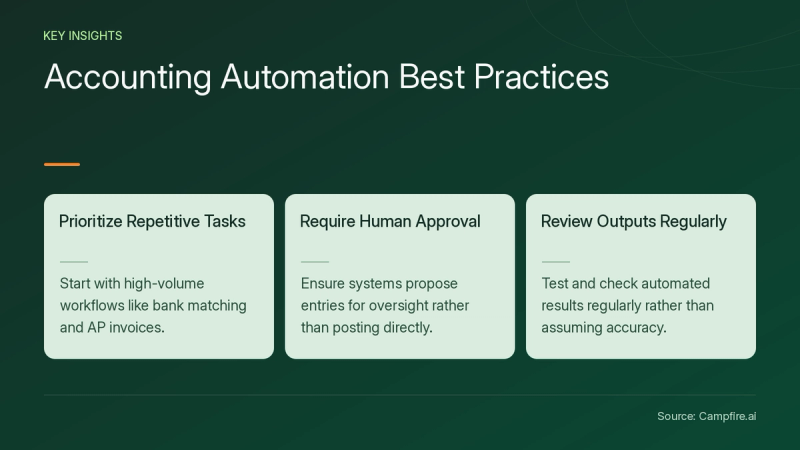
Key Takeaways
- The strongest first candidates are high-volume, repetitive tasks such as expense capture, AP invoice processing and bank matching (Rillet[c1]).
- Good automation proposes entries for human approval instead of posting without oversight (Rillet[c1]).
- Published results include Stuart Plumbing cutting invoicing time by 30-40% (DocuWare[c2]).
- Never assume automated output is correct. Test and review it regularly (Karbon[c3]).
What Are Examples of Automation in Accounting?
Accounting automation examples span capture, matching, coding and close work. The table summarizes eight workflows described in the cited public sources.
| Example | What software does | What a person still checks |
|---|---|---|
| Expense receipt capture | What software doesA phone app photographs receipts and extracts data into cloud accounting software (Karbon (https://karbonhq.com/resources/accounting-automation-ideas/)[c3] (https://karbonhq.com/resources/accounting-automation-ideas/)) | What a person still checksMiscoded or unreadable receipts |
| AP invoice processing | What software doesExtracts supplier names, PO numbers, tax details and totals, matches to purchase orders and routes to approvers (Tipalti (https://www.youtube.com/watch?v=czLAZYUYQDA)[c4] (https://www.youtube.com/watch?v=czLAZYUYQDA)) | What a person still checksFlagged discrepancies and approvals |
| Bank transaction matching | What software doesMatches bank transactions to GL entries, including multi-currency and variances (Campfire (https://campfire.ai/accounting-intelligence)) | What a person still checksProposed matches before approval |
| Transaction categorization | What software doesProposes coding for unclassified items based on chart of accounts, vendors and patterns (Campfire (https://campfire.ai/accounting-intelligence)) | What a person still checksAccount, department and class coding |
| Duplicate detection | What software doesCatches duplicates from integrations and intercompany transfers (Campfire (https://campfire.ai/accounting-intelligence)) | What a person still checksWhether flagged items are true duplicates |
| Accruals and prepaids | What software doesSuggests month-end accruals from historical patterns and amortizes prepaids on schedule (Campfire (https://campfire.ai/accounting-intelligence)) | What a person still checksReviewing and posting the accrual |
| Revenue recognition | What software doesPulls closed-won deals from the CRM and generates ASC 606 schedules from contract terms (Rillet (https://www.rillet.com/blog/accounting-automation)[c1] (https://www.rillet.com/blog/accounting-automation)) | What a person still checksContract terms and changes |
| Close and workflow tracking | What software doesChecklists assign owners and surface blockers; status rules mark tasks as waiting or in progress (Rillet (https://www.rillet.com/blog/accounting-automation)[c1] (https://www.rillet.com/blog/accounting-automation), Karbon (https://karbonhq.com/resources/accounting-automation-ideas/)[c3] (https://karbonhq.com/resources/accounting-automation-ideas/)) | What a person still checksSign-off on each close task |
Which Companies Have Published Automation Results?
Several companies have published accounting automation outcomes in vendor case studies. These are vendor-reported results, not independent benchmarks.
- Stuart Plumbing: processed over 2,000 supplier invoices monthly, reduced invoicing time by 30-40% and kept the same staff overhead while growing 15% (DocuWare[c2]).
- DigitPro: an Australian firm that saves 8 hours per week through automation (Karbon[c3]).
- DreamHost: brought invoice capture, approval workflows and global disbursements into one system, with a supplier self-service hub (Tipalti[c4]).
- Thematic: automated payee onboarding, including collecting W-9, W-8 and VAT forms, for global creator payouts (Tipalti[c4]).
- Fora: Controller Adam Schneider said Campfire helped them with "saving time, closing faster, and growing more sustainably" (Campfire).
What Does an Automated Accounting Workflow Look Like?
An automated accounting workflow ingests transactions, applies rules or AI to code them, and routes proposals to a person for approval. Rillet describes this as data ingestion, rules and AI, human review and continuous sync (Rillet[c1]).


Campfire's Accounting Intelligence follows a similar pattern: transactions arrive from bank feeds, billing systems and expense tools, the model categorizes account, vendor, department and class, and you review and approve. Teams can set automatic approval thresholds by activity, and every action is attributed. That page covers matching, categorization, duplicates, accruals and prepaids, not AP purchase-order matching or payroll.
How Do You Pilot Accounting Automation Safely?
Pilot one high-volume workflow in review-first mode, then widen scope once outputs prove accurate. Here is a hypothetical walkthrough for a team automating bank matching.


- Map the workflow. Document where data originates, who touches it and where handoffs occur (Rillet[c1]). Check: every source account is listed.
- Pick the highest-volume task. Prioritize by time spent and error frequency (Rillet[c1]). Check: you know last month's hours on the task.
- Confirm connections. Inventory billing, banking, payroll and expense tools. Check: each source connects natively or via a documented import.
- Run propose-and-approve. Keep every entry in review for the first close cycle. Check: compare automated matches against a manual sample.
- Test regularly. Karbon warns against incorrect setup and assuming correct results (Karbon[c3]). Check: log rejected proposals and why.
- Raise thresholds gradually. Allow auto-approval only for categories with a clean review record.
For step 3, review Campfire's integrations page and ask any vendor which of your specific systems connect and how sync errors surface.
Conclusion
The most useful accounting automation examples target repetitive work: receipts, invoices, bank matching, coding, duplicates, accruals and close tracking. Start with one high-volume task, keep humans approving proposals, and expand once results hold up. To see review-first matching and categorization in practice, get started with Campfire.
FAQ
What is an example of an automated accounting system?
An example is software that ingests bank and billing transactions, proposes GL coding and matches, and routes them for approval with an audit trail, as Campfire describes on its Accounting Intelligence page.
Can accounting be fully automated?
No, accounting cannot be fully automated, according to Rillet[c1], which recommends propose-and-approve workflows over autonomous action so finance teams keep control of the ledger.
Which accounting task should I automate first?
Automate the task with the most volume and errors first, which is often expense capture, AP invoice processing or bank reconciliation, since these involve repetitive, rules-based steps (Rillet[c1]).
What are the risks of accounting automation?
Karbon lists incorrect setup, assuming results are correct, automating tasks too complex to justify the effort, and overdependence that distances you from clients as the main risks to manage (Karbon[c3]).
Sources
- [c1] Accounting Automation: How It Works, Where to Start | Rillet — rillet.com. Accessed November 16, 2026.
- [c2] Your Complete Guide to Accounting Document Automation for Business Efficiency — start.docuware.com. Accessed November 16, 2026.
- [c3] 10 time-saving accounting automation ideas — karbonhq.com. Accessed November 16, 2026.
- [c4] Accounting Automation Explained: Improve Accuracy and Save Time - YouTube — youtube.com. Accessed November 16, 2026.