Accounting Automation Risk and Controls to Test Before Go-Live
Listen to article
4:35
Accounting automation risk is the chance that an automated workflow posts, omits, duplicates or misclassifies an item, or accepts a change your team did not authorize. Before go-live, choose one workflow and test it with inputs whose expected results you already know. Compare the ledger output with your expected output and record how the workflow handles exceptions.
Start with a single entity and a defined handoff to the ledger. For related reading on how to organize that handoff, see Campfire’s Core Accounting overview.

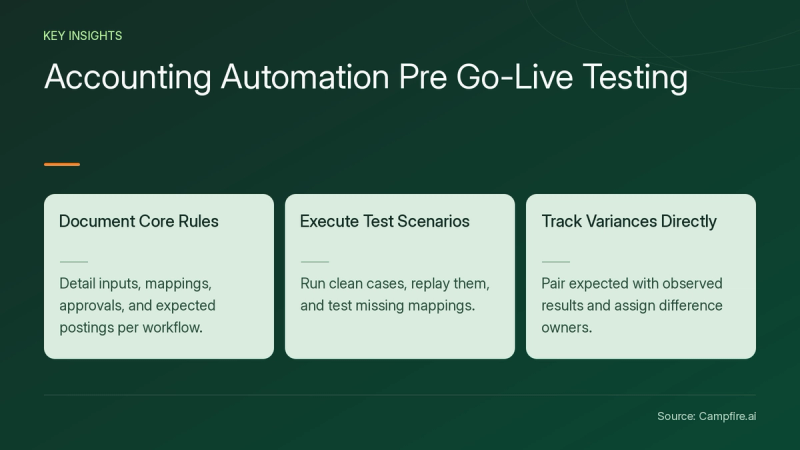
Key Takeaways
- List the inputs, mapping rules, permitted approvals and expected postings for one workflow.
- Run a clean case, replay it and try a missing mapping with a fresh sample item.
- Keep the expected and observed results together, with a named owner for unresolved differences.
Where can an automated accounting workflow go wrong?
Trace the workflow from intake to posting. Write down where it reads the entity and account, where it decides an item can post and how you locate the resulting ledger entry. At each step, identify one input you can change to test the expected behavior.
For example, send a sample invoice with an account code missing from the approved mapping. Decide in advance whether your test expects the item to be held. Compare both the exception record and the ledger so your reviewer can tell where the item ended up.
In its standard for integrated audits, PCAOB AS 2201, Appendix B[c1] discusses benchmarking automated application controls. It points to controls over program changes, access and operations, and describes how an automated control can depend on related data or configuration. Use that distinction to identify which rule and underlying mapping your own pilot needs to test.


How do you test a posting workflow before go-live?
Use this hypothetical invoice batch for a test of one entity. Sample invoice A is $120 and sample invoice B is $80. In this test, both have an approved mapping and approval. The expected result is two posted invoices totaling $200. Save the expected amount and both sample IDs before running the batch.
| Test | Expected result for this sample | Evidence to keep |
|---|---|---|
| Clean batch | Expected result for this sampleBoth invoices post for a combined $200 | Evidence to keepInput IDs and the two ledger references |
| Replay the batch | Expected result for this sampleZero additional invoices post and the total remains $200 | Evidence to keepRun history and unchanged ledger entries |
| Send a fresh invoice with no account mapping | Expected result for this sampleThe invoice is held before it reaches the ledger | Evidence to keepException status and a ledger search for the sample ID |
| Try an approval from an unapproved role | Expected result for this sampleThe invoice stays pending | Evidence to keepApproval history and the remaining queue item |
Compare the IDs and the total separately. If a case differs from the expected result, keep the run history, assign the difference to a reviewer and repeat the case after the mapping or approval rule is corrected. Let the reviewer check the current rule before marking the result accepted.


What should change when you update the rules?
For federal agencies, the GAO 2025 Green Book overview[c2] describes documenting how significant changes are assessed and emphasizes preventive controls. For this pilot, keep a short change record that names the affected mapping or posting rule, the sample to rerun and the reviewer who will accept the result.
Review the workflows in Campfire’s Accounting Intelligence overview when choosing the next process to evaluate. Use its own sample inputs and expected results so the two tests can be repeated separately.
Conclusion
Start with one posting rule, two known inputs and an exception. Compare what actually posted with your worksheet. Keep the inputs, ledger results and decision together, and bring that test when you get started with Campfire.
FAQ
Which automation should I test first?
Choose a workflow with a clear source list and ledger output. A small invoice batch gives you stable IDs and amounts to compare before moving to another workflow.
How do I know a replay passed?
Set the expected result before the test. In the sample above, both original invoices remain posted once and a second run adds zero entries. Check the sample IDs and the ledger total.
What evidence should I keep after an exception test?
Keep the input, the mapping or approval rule used, the observed status, the ledger lookup and the owner’s decision. A reviewer should be able to repeat the case with the same sample.
Sources
- [c1] AS 2201: An Audit of Internal Control Over Financial Reporting That Is Integrated with An Audit of Financial Statements | PCAOB — pcaobus.org. Accessed November 16, 2026.
- [c2] Standards for Internal Control in the Federal Government | U.S. GAO — gao.gov. Accessed November 16, 2026.