Affordable Accounting Automation for Growing Businesses: Cost Guide
Listen to article
10:23
Yes, affordable accounting automation tools exist for growing businesses. The best value is the lowest total cost for a workflow that actually works, not the cheapest advertised subscription. That total includes the plan tier that unlocks automation, integrations, setup, data cleanup and the time your team spends reviewing exceptions. This guide shows how to price the full workflow, decide whether to keep, extend or replace your ledger, and test a tool before you commit.

Key Takeaways
- Free bookkeeping and automated bookkeeping are different. Free plans can carry feature and usage limits[c1], so confirm which tier includes bank feeds, auto-categorization and accounting sync.
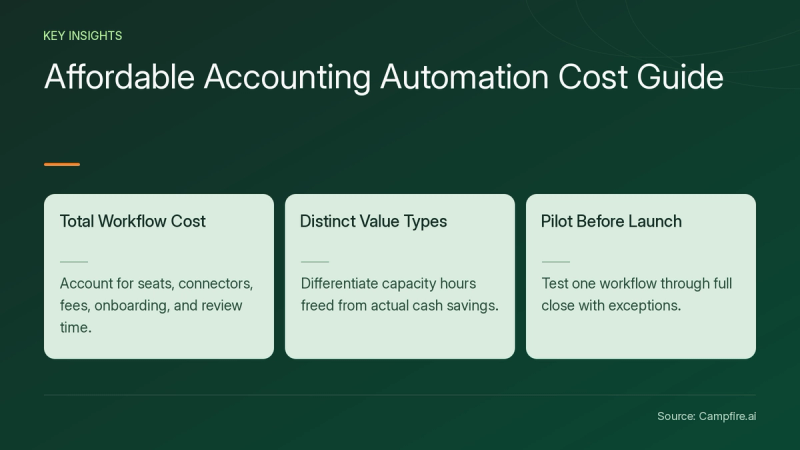
- Price the full workflow: seats, connectors, transaction fees, onboarding and ongoing review time.
- Separate capacity value (hours freed) from cash savings (spending that actually falls).
- Choose the smallest stack that meets your reporting and control needs. An add-on can beat replacement, and replacement can beat a pile of add-ons.
- Pilot one workflow through a full close, with exception tests, before go-live.
What Makes an Accounting Automation Tool Affordable?
An accounting automation tool is affordable when the time and errors it removes are worth more than its full cost of ownership. The subscription is only one line in that calculation.
Automation also comes in levels. Some tools only suggest coding. Others route items for review, and some post automatically above a set threshold. For example, AI transaction categorization and bank matching in Campfire proposes coding, flags duplicates and lets you set automatic approval thresholds while keeping an audit trail. Know which level you are paying for.
| Cost component | What to check |
|---|---|
| Plan tier | What to checkDoes the entry tier include bank feeds, auto-categorization and two-way sync, or only manual import? |
| Seats | What to checkIs pricing per user or per organization? |
| Integrations | What to checkNative connector, paid connector or CSV import? |
| Transaction fees | What to checkPayment processing and per-transaction charges |
| Setup | What to checkChart-of-accounts mapping, duplicate cleanup, opening balances |
| Review time | What to checkHours spent approving suggestions and fixing exceptions |
Which Accounting Automation Tools Fit a Growing Business?
The right tool depends on whether your bottleneck is basic bookkeeping, one high-volume workflow or finance operations that have outgrown a small-business ledger. Match the tool type to the problem before comparing prices.
| Tool type | Best fit | Typical automation | Watch for |
|---|---|---|---|
| Small-business ledger with built-in automation | Best fitSingle entity, simple invoicing and expenses | Typical automationBank feeds, rules-based categorization, invoice reminders | Watch forAutomation locked to higher tiers; limits on free plans |
| Specialist add-on (AP, expenses, receivables) | Best fitOne workflow creating most of the manual work | Typical automationInvoice capture, approvals, payment scheduling, sync to ledger | Watch forPer-user pricing; sync only on higher tiers; cross-tool reconciliation |
| AI-native ERP | Best fitGrowing finance teams with high transaction volume | Typical automationCategorization, bank matching, duplicate detection, accrual suggestions that you review before posting | Watch forMigration effort; confirm pricing directly with each vendor |
Should you keep, extend or replace your ledger?
Keep your ledger if a better configuration of its existing tier solves the problem. Extend it with an add-on when one workflow, such as AP approvals, drives most of the manual effort. Replace it when you reconcile several tools every month, consolidate entities in spreadsheets or outgrow reporting limits.


- Hypothetical service business: one entity, slow collections. Keep the ledger and turn on invoice reminders and bank feeds.
- Hypothetical growing AP team: rising invoice volume and approval delays. Extend with an AP tool that offers two-way sync.
- Hypothetical multi-entity company: manual consolidation and intercompany matching. Evaluate a platform replacement.
Whichever path you choose, measure the effect on your own volumes during a pilot rather than relying on vendor averages.
How Do You Calculate Total Cost and Payback?
Calculate payback by subtracting recurring costs from the value of net hours saved after review, then dividing one-time setup cost by that monthly gain. Use your own baseline data.
| Line item (hypothetical) | Monthly |
|---|---|
| Net hours saved after review time | Monthly20 hours |
| Assumed loaded cost per hour | Monthly$50 |
| Capacity value | Monthly$1,000 |
| Recurring software, seats and connectors | Monthly-$250 |
| Net monthly capacity gain | Monthly$750 |
| One-time setup and cleanup | Monthly$1,500 |
| Capacity-value payback | Monthly2 months |
All figures above are illustrative assumptions. Capacity payback is not cash payback. Freed hours become cash savings only if spending falls, such as fewer contractor hours or a delayed hire. Otherwise, the gain is redeployed time for analysis, collections or a faster close.
Count hidden costs too. A cheaper tier that relies on CSV imports can add weekly re-entry and reconciliation work that erases its price advantage.


How Should You Pilot an Accounting Automation Tool?
Pilot one workflow through a complete accounting cycle, with a named owner and pass/fail criteria, before rolling out more broadly. This exposes data problems and review workload early.
- Baseline: record handling time, review time, exception rate and close duration for one workflow.
- Map the handoffs: trace one spreadsheet process from export to reconciliation to approval. Note which steps still need an accountant's judgment.
- Clean and map data: fix the chart of accounts, remove duplicates and confirm opening balances.
- Configure controls: set reviewer permissions, approval limits and auto-approval thresholds.
- Run in parallel: process one full close in both systems and reconcile balances.
- Decide: the controller signs off, or you roll back if acceptance tests fail.
If migration is part of the plan, budget for it explicitly and ask each vendor who owns data mapping and validation of migrated balances. Campfire describes its approach on its implementation and migration page.
What should acceptance tests cover?
Acceptance tests should prove the tool catches the errors that cost you most. Assign each exception an owner.
| Test | Pass condition | Owner |
|---|---|---|
| Duplicate invoice or transaction | Pass conditionFlagged before posting | OwnerAP or staff accountant |
| Uncertain coding | Pass conditionRouted to review, not auto-posted | OwnerStaff accountant |
| Reviewer reclassification | Pass conditionChange logged in activity history | OwnerController |
| Vendor bank-detail change | Pass conditionRequires independent approval | OwnerController |
| Failed sync | Pass conditionAlert raised; no silent data gaps | OwnerSystem owner |
| Payment above approval limit | Pass conditionBlocked until authorized | OwnerFinance lead |
Conclusion
Affordable accounting automation is widely available, but the true price is the cost of a working, controlled workflow. Identify your biggest bottleneck, decide whether to keep, extend or replace your ledger, and model total cost with honest review time. Separate capacity gains from cash savings, and confirm current pricing and tier features directly with each vendor.
Then pilot one workflow through a full close, run exception tests and require sign-off before go-live. If your team is outgrowing spreadsheets and disconnected tools, compare an AI-native ERP against your current stack and get started with Campfire.
FAQ
Is free accounting software enough for a growing business?
Free accounting software can be enough for a very small, single-entity business, but growing businesses often need paid tiers for automation features and higher limits, as the U.S. Chamber's review of free accounting tools[c1] notes when discussing upgrades. Check which automations each tier includes before assuming the free plan will scale.
How long does it take to see value from accounting automation?
Value usually becomes measurable only after at least one complete accounting cycle, because you need to compare baseline handling, review and close time against results that include real exceptions. Treat any vendor time-to-value estimate as a planning assumption, not a guarantee.
Will accounting automation reduce headcount?
Accounting automation does not necessarily reduce headcount, because freed hours often shift to review, analysis or growth work rather than lowering payroll. Count cash savings only when spending actually falls, such as reduced contractor hours or a delayed hire.
Is it safe to let AI post accounting entries?
AI posting is safer when it runs with reviewer permissions, approval thresholds, exception routing and a full audit trail, so a person approves anything uncertain or above a set limit. Test these controls during a pilot by changing a flagged item and confirming the change is logged.
When should a business replace its accounting platform instead of adding tools?
A business should consider replacing its platform when it spends significant time reconciling data across several tools, consolidates entities manually or hits reporting limits it cannot configure around; if one workflow causes most of the manual effort, an add-on is often the cheaper fix.
Sources
- [c1] Best Free Accounting Software for Small Businesses | CO- by US Chamber of Commerce — uschamber.com. Accessed November 17, 2026.