FP&A Tools With Flexible Scenario Planning and How to Test Them
Listen to article
4:27
Yes. Start with a scenario your FP&A team needs to run, then ask each vendor to show how it would preserve the baseline, apply a new assumption and produce a comparison that your team can check. Start with the documented copying workflows below and bring the same sample to each demonstration.
Use the same source file in each demonstration. For related reading on where that data starts, see Campfire’s Core Accounting overview.

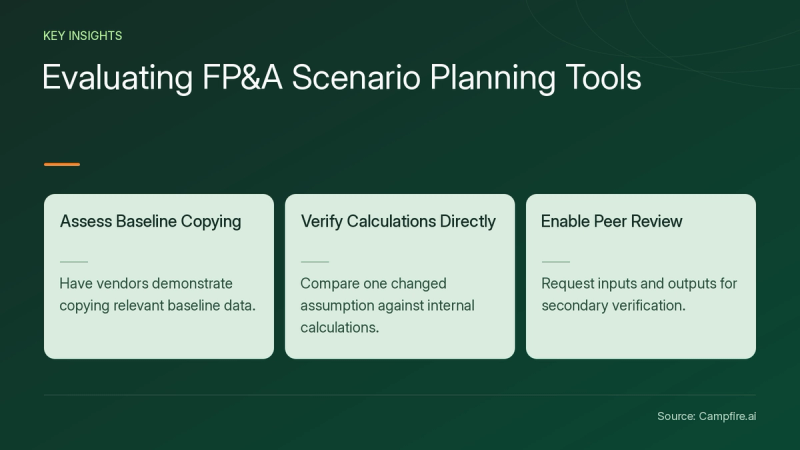
Key Takeaways
- Ask each vendor to show how it copies the relevant portion of a baseline.
- Test a single changed assumption and compare the result with your own calculation.
- Ask for a copy of the inputs and outputs so another reviewer can repeat the test.
Which tools document scenario or version copying?
In Dynamics 365 Finance Business performance planning, Microsoft’s guide to the Copy visual[c1] describes transferring baseline actuals or forecasts to a new planning or forecasting scenario. The guide also describes applying filters when copying data for a department or a product. Ask the vendor to demonstrate a copy limited to the area your planner is responsible for.
For Oracle Planning and Budgeting Cloud, Oracle’s guide to copying versions[c2] describes copying data from one version to another within a selected scenario. Ask the vendor to show where the source and destination versions appear in a report and how your team would distinguish them from a separately defined scenario.
Give each vendor the same business task even if they label the objects differently. Ask them to name the baseline and comparison in the demo, then save what they used so your team can identify it in the output.


How can a finance team test flexible scenario planning?
Use a fictional sales plan for one quarter and two departments. Set Department A to 100 units at $10 each and Department B to 50 units at the same price. For this example, the total baseline revenue is $1,500. Give the vendor the file and ask for a second case where only Department A drops to 80 units. The expected result for that case is $1,300, or $200 below the baseline.
| Test | Expected result for this sample | What to keep |
|---|---|---|
| Copy the quarter baseline | Expected result for this sampleBoth departments total $1,500 in the new case before edits | What to keepBaseline name, case name and copied fields |
| Change Department A units | Expected result for this sampleThe new total is $1,300, and Department B stays at $500 | What to keepThe changed assumption and the result by department |
| Reopen the baseline | Expected result for this sampleThe baseline remains $1,500 | What to keepA comparison export or screenshots with both cases identified |
Ask the presenter to retrace the $200 difference from the comparison back to the changed unit assumption. Then let a second participant repeat the test with the same file. Record any setup the presenter had to do first along with what the second participant needed to reproduce the output.


What should you keep after the demonstration?
Keep the input file, a note of the filters, the changed assumption and the resulting comparison. Ask who can change the shared baseline and how the owner would restore it if an editor made a mistake. Write down the role the vendor used during the demo so you can test again with the permissions your own planners would have.
Before using a more complex case, decide which data or workflows your next test will cover. Campfire’s Accounting Intelligence overview is related reading for choosing the adjacent workflows to evaluate.
Conclusion
Ask for one repeatable planning test before comparing broader capabilities. Bring your baseline file, one assumption to vary and the evidence you need to see when you get started with Campfire.
FAQ
What should I test in a scenario planning demo?
Ask to copy a baseline, change one assumption and show the impact by department. Reopen the baseline and compare both cases with your worksheet.
How should we label the baseline and comparison?
Agree on names your reviewers can recognize in the output. Ask the presenter to identify the source and destination before making the copy, and record the names used in the demonstration.
How can a reviewer reproduce the result?
Give the reviewer the same input file, case names, filters and changed value. Ask them to rerun the calculation and compare the baseline and revised results with your expected totals.
Sources
- [c1] Copy visual - Finance | Dynamics 365 | Microsoft Learn — learn.microsoft.com. Accessed November 18, 2026.
- [c2] Copying Versions — docs.oracle.com. Accessed November 18, 2026.