Can You Allocate Shared Costs Across Subsidiaries Without Spreadsheets?
Listen to article
8:10
Yes, conditionally. A modern accounting system can calculate and post recurring shared-service allocations across subsidiaries without a monthly allocation workbook, but only when driver data, allocation rules and intercompany accounts are configured and tested. Oracle NetSuite documents allocation schedules weighted by statistical-account balances, yet full automation still depends on configuration and access to driver data. Oracle NetSuite's allocation documentation shows the capability; a demo must confirm it for your entities.

Key Takeaways
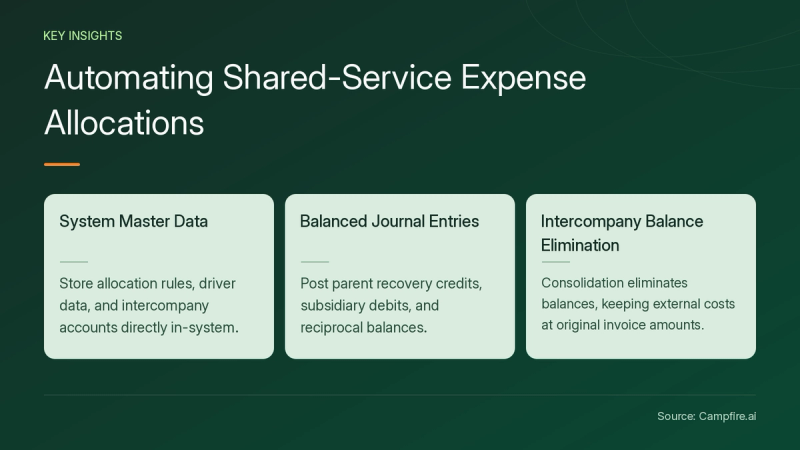
- Recurring allocations can run without a workbook when the system holds driver data, allocation rules and intercompany accounts.
- Each allocation should post balanced entries: a parent recovery credit, subsidiary expense debits and reciprocal payable and receivable balances.
- Consolidation eliminates intercompany balances, so the external cost stays at the original invoice amount.
- Stale drivers, zero denominators, rounding and closed-period reruns decide whether automation holds up.
- Automated calculation does not establish transfer pricing or tax treatment for cross-border services.
How Do Subsidiary Entries Balance Without a Workbook?
The system posts the vendor bill once, then an allocation journal moves each subsidiary's share as a reciprocal balance. Consider a $12,000 technology invoice shared by a parent and three subsidiaries, where the parent retains $3,000 and allocates $3,000 to each subsidiary. Campfire Core Accounting covers general ledger, journal entries and multi-entity and multi-currency consolidation, the components this workflow requires.
| Step | Entity | Account | Debit | Credit |
|---|---|---|---|---|
| 1. Record vendor invoice | EntityParent | AccountShared services expense | Debit12,000 | Credit |
| EntityParent | AccountAccounts payable | Debit | Credit12,000 | |
| 2. Allocate shares | EntityParent | AccountIntercompany receivable (three subsidiaries) | Debit9,000 | Credit |
| EntityParent | AccountShared services expense (recovery) | Debit | Credit9,000 | |
| 3. Record each share | EntitySubsidiaries A, B and C | AccountManagement fee expense | Debit3,000 each | Credit |
| EntitySubsidiaries A, B and C | AccountIntercompany payable to parent | Debit | Credit3,000 each | |
| 4. Eliminate at consolidation | EntityConsolidated | AccountIntercompany payable | Debit9,000 | Credit |
| EntityConsolidated | AccountIntercompany receivable | Debit | Credit9,000 |
After step 2, the parent keeps $3,000 of expense. Consolidated expense totals $12,000, which matches the external invoice. Whether the recovery appears as an expense credit or as income depends on your accounting policy.
Which Drivers and Controls Replace the Allocation Workbook?
Automation replaces the workbook when drivers, approvals and posting rules live in the system with an audit trail. Each run should store the rule version and the driver snapshot it used.


- Named owner and refresh schedule for each driver, such as headcount or usage
- Approval step before intercompany entries post
- Stored driver snapshot and rule version for every run
- Reciprocal balance check before period close
Driver data must arrive from source systems on time, so review Campfire's native integrations for payroll and other finance connections. For review, Ember AI proposes intercompany reconciliation actions that accountants review and approve. Vendor tools are adding allocation-specific features; a July 2026 Netgain release note describes copying transaction details onto intercompany allocation lines and handling exchange rates on allocation journals.
In Campfire’s published Klarity case study, Klarity used Ember to generate allocation entries across its business lines and legal entities. To assess the same workflow, run an approved shared-cost pool across two entities, change one driver, and trace both sets of entries back to the original expense.
Which Exceptions Break Automated Allocations?
Stale drivers, zero denominators, rounding, failed imports, corrected invoices and closed-period reruns cause most allocation failures. Test each one before go-live and treat the expected results as acceptance criteria.


| Exception | Test in a demo or pilot | Expected result to confirm |
|---|---|---|
| Stale or missing driver | Test in a demo or pilotLoad headcount dated before the period | Expected result to confirmPosting is blocked and the entity is flagged |
| Zero denominator | Test in a demo or pilotRun with zero headcount in every entity | Expected result to confirmRun stops with an error and posts nothing |
| Rounding | Test in a demo or pilotSplit $10,000 three ways | Expected result to confirmShares sum to the pool, and the difference posts to a named account |
| Failed import | Test in a demo or pilotInterrupt a driver file load | Expected result to confirmPartial data is rejected and the prior snapshot is retained |
| Corrected invoice | Test in a demo or pilotReverse and repost the $12,000 invoice | Expected result to confirmReversal mirrors the original reciprocal entries |
| Closed-period rerun | Test in a demo or pilotRerun a closed month | Expected result to confirmEntries post to the open period with approval, or are blocked |
These tests matter because manual work persists when they fail. In a 2026 Vena close survey, 71% of spreadsheet-only teams spent at least a quarter of close on manual work, versus 52% of teams using ERP consolidation features. That comparison is observational and does not prove the ERP caused the difference. Vena's close benchmark survey is the source.
Does Automated Allocation Settle Transfer Pricing?
No. An automated allocation calculates a management share, but it does not set arm's-length pricing, tax treatment or settlement terms. The IRS transfer pricing guidance notes that Section 482 generally applies an arm's-length standard to controlled transactions.
| Situation | System can automate | Needs separate review |
|---|---|---|
| Domestic entities sharing software | System can automateShare calculation and reciprocal entries | Needs separate reviewAllocation method and documentation |
| Cross-border shared services | System can automateShare calculation and reciprocal entries | Needs separate reviewArm's-length pricing, markups and tax treatment |
| Mixed currencies | System can automateEntries with exchange-rate fields | Needs separate reviewSettlement and period-end remeasurement policy |
Conclusion
Modern systems can handle recurring shared-service allocations without an allocation spreadsheet when drivers, reciprocal entries, consolidation eliminations and exception tests are proven. Run the $12,000 walkthrough against one real invoice before retiring the workbook. Use the exception table as your demo checklist, and keep pricing and tax decisions with your controllers and advisors. To see how this workflow fits a multi-entity close, get started with Campfire.
FAQ
Can any ERP allocate shared expenses without spreadsheets?
Not every ERP does this natively. Some systems support statistical-account allocation schedules and intercompany allocation, but the result depends on configuration, driver data and posting rules. Test the workflow with one real invoice and one driver file before you rely on it.
Do shared-expense allocations require intercompany accounts?
Yes, when the entities are separate legal books. Reciprocal due-to and due-from balances record each subsidiary's share, so each entity's books balance and consolidation can eliminate the intercompany amounts.
Does automation remove the need for controller review?
No. Controllers still choose the allocation method, approve drivers, review exceptions and decide how recoveries are presented. Automation reduces manual steps, but accountability for the allocation policy stays with finance leadership.
Sources
Oracle NetSuite’s guide to allocations weighted by statistical-account balances