Can Accounting Automation Learn Your Policies and Keep Exceptions Visible?
Listen to article
6:56
Yes, some accounting automation software can learn department and account policies from your transaction history while routing proposed coding to reviewers for approval. Campfire's Proprietary Foundation Model, for example, proposes accounts, vendor, department and class based on your history, policies and patterns. You then review and approve each proposal, and each action has an audit trail. The way to verify this for your team is to test it on your own data, using exceptions you already know about.

Key Takeaways
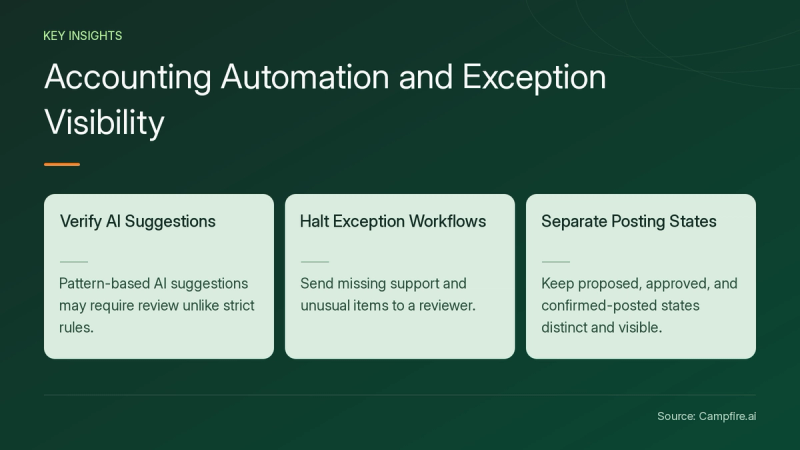
- Some platforms learn policies from history. Campfire says its model learns your policies, chart of accounts and standards through your own transaction history (Campfire).
- Rules and AI suggestions work differently. Rules follow instructions you set. AI suggests actions based on patterns, so those suggestions may need checking (AccountsIQ).
- Exceptions should never be forced through a rule. Missing support and unusual items should stop the workflow and go to a reviewer (Truewind).
- Keep proposed, approved and confirmed-posted as separate, visible states (Safebooks).
How does accounting automation software learn department and account policies?
Some platforms learn from your approved transaction history and use it to propose coding for new activity. Campfire describes a model that proposes coding for unclassified transactions and learns your chart of accounts, vendors and patterns. It categorizes accounts, vendor, department and class based on your history, policies and patterns (Campfire).
Learned suggestions are a separate thing from configured rules. AccountsIQ describes rule-based automation as following instructions you set, such as routing invoices above a threshold for approval. AI, by contrast, might recommend a cost code because similar invoices were recorded there before (AccountsIQ). Truewind describes applying confirmed treatment and prior reviewer corrections to later periods (Truewind).
How do exceptions stay visible to reviewers?
Exceptions stay visible when the workflow stops on unusual items, keeps the source context and routes the item to a person. Safebooks recommends that missing records or inconsistent amounts become exceptions rather than assumed matches. It also recommends keeping prepared, approved and confirmed-posted as distinct states (Safebooks).
Campfire lets you set automatic approval thresholds for any activity, or keep every item under manual review. Every action is attributed, so you can see why a transaction was categorized (Campfire). Even well-learned department coding should go to a reviewer for unusual or one-off costs (AccountsIQ).

What should you check in a demo?
Check whether the vendor can show the exception path working on your data, beyond the clean cases where everything matches. Use these checks:
| Check | Question to ask | Source |
|---|---|---|
| Explanations | Question to askCan I see why this coding was suggested? | SourceAccountsIQ vendor questions |
| Approval boundary | Question to askWhich actions post automatically, and what invalidates an earlier approval? | SourceSafebooks evaluation guide |
| Known exception | Question to askHow is a duplicate or missing record detected, assigned and resolved? | SourceSafebooks evaluation guide |
| Permissions | Question to askDoes the AI follow our existing user permissions? | SourceAccountsIQ vendor questions |
| Traceability | Question to askCan I see the source, mapping, policy applied and prior similar entries? | SourceLedge review tips |
| Rule changes | Question to askAre changes to mappings recorded, approved and retested? | SourceSafebooks controls |
Ask how the platform connects to your bank, billing and expense sources. Campfire's integrations page is related reading for that part of your evaluation.
How do you test policy learning with a hypothetical walkthrough?
Test it by replaying a closed period whose correct answers you already know. The approach below follows the pilot guidance from Safebooks and AccountsIQ. The example is hypothetical.

- Pick one workflow. For example, choose department coding for software vendors from last quarter.
- Seed known exceptions. Include a vendor that Engineering usually pays but Marketing paid once, plus a duplicate charge.
- Run with review on. Record which suggestions reviewers accept, change or reject.
- Check who caught each error. Note whether the system flagged it or the reviewer found it.
- Compare against the approved result. Investigate every difference before you widen the scope.
Verification check: if the one-off Marketing charge was auto-coded to Engineering without a flag, keep manual approval on for that vendor category. Ledge suggests expanding approval responsibility gradually, starting with routine items within defined thresholds (Ledge).
For setup questions during a pilot, Campfire's implementation and migration page is related reading.
Conclusion
Accounting automation can learn your department and account policies. You still need to verify that learning, and exceptions need a visible path to a reviewer. Test with your own history, seed known exceptions, and keep approval on until the results earn your trust.
Disclosure: this article is published by Campfire. Campfire's model proposes accounts, departments and classes from your history and policies, with attributed actions and configurable approval thresholds. To see it on your data, get started with Campfire.
FAQ
Can we keep reviewing every transaction manually?
Yes, on platforms such as Campfire, which says you can set automatic approval thresholds for any activity or keep your hands on the wheel and review and approve each item (Campfire).
How does the software learn our department policies?
Campfire says its model learns your policies, chart of accounts and standards through your own transaction history, then proposes accounts, vendor, department and class for new activity (Campfire).
Which items should always go to a reviewer?
AccountsIQ recommends human review for unusual or one-off costs, accounting estimates, tax decisions, group accounting and financial sign-off, even when AI suggests the coding (AccountsIQ).
What should a reviewer see on an exception?
A reviewer should see the source transactions, the calculation or mapping, the policy applied, similar prior entries and a record of changes and approvals, as outlined by Ledge.
Sources
- [c1] AI Accounting Software: What to Automate, What to Review, and What to Keep Human | AccountsIQ — accountsiq.com. Accessed November 20, 2026.
- [c2] Accounting Automation Myths That Keep Finance Teams Stuck in Manual Work | Truewind — truewind.ai. Accessed November 20, 2026.
- [c3] Accounting Automation: Workflows & Controls | Safebooks — safebooks.ai. Accessed November 20, 2026.
- [c4] Practical tips for accountants learning to review AI-generated work — ledge.co. Accessed November 20, 2026.