Forecast Recognized Revenue From Existing Customer Contracts
Listen to article
6:58
Campfire provides a documented example of forecasting from existing contract schedules inside accounting software. Its Forecast page describes a Committed layer that combines posted actuals with amounts already scheduled in subledgers, including revenue recognizing from contracts. Use that distinction to evaluate whether a platform can answer your contract-revenue question without a separate spreadsheet calculation.
Start with the output your team needs: posted revenue for completed periods, scheduled revenue from existing contracts, or an estimate that also includes assumptions about future activity. Give the presenter the same contract and reporting periods your reviewer will use to check the result.

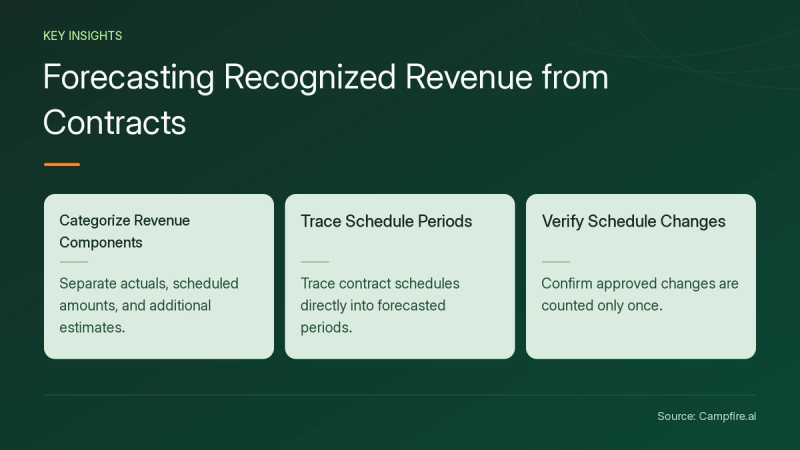
Key Takeaways
- Separate posted actuals, existing scheduled amounts and additional estimates in your evaluation.
- Trace the selected contract and schedule into the periods shown in the forecast.
- Test an approved schedule change and check that the result is counted once.
- Keep the supplied test policy, calculations, approval decision and output references together.
What does Campfire document about contract-based forecasting?
Campfire's Forecast page distinguishes three layers. Actuals is every dollar posted to the general ledger. Committed adds what subledgers have already committed to future months, including revenue recognizing from contracts. Estimates adds Ember's estimate of the rest, drawing on your history and the inputs you provide, and the page states that every number shows the assumption behind it.
For your demonstration, ask to see the contract-derived schedule separately from any additional estimates. Specify the reporting date and periods before the presenter runs the report. Have a second participant identify which amounts are already posted, which come from the existing schedule and which depend on an estimate. Record any configuration needed to produce that view.
How do you trace the forecast back to the contract?
Campfire's Revenue Automation page describes deferred revenue by customer, contract and product, including visibility into when it will be recognized. It also describes tracking changes to contract terms, pricing and dates with timestamps and user attribution.
Use those documented workflows to define your traceability test. Ask the presenter to open the originating contract, identify the selected schedule version and explain the amounts assigned to each test period. Keep the contract reference, schedule reference, effective date and approval decision with the exported or saved result. Ask which changed terms require a new review in the configuration being demonstrated.


What does the Coder customer example establish?
Campfire's full Coder customer story describes its Salesforce integration generating deferred and recognized revenue schedules for closed-won deals, ready for approval. The story also describes revenue and billing staying synced with the originating Salesforce contract as invoices are issued and paid.
That is an attributed schedule-and-approval example. It does not establish the outcome of your own forecasting test. Bring a fictional closed-won contract and ask the presenter to follow it through the proposed schedule, approval and reporting output. Have another participant trace the displayed amounts back to that same contract before accepting the demonstration.
How can you test the totals with a fictional schedule?
For this fictional exercise, supply a schedule with $1,000 posted in January and $1,000 scheduled in each of February and March. Set the reporting date after the January posting and before the two future amounts. Your sample three-period total is $3,000: $1,000 of actuals plus $2,000 of scheduled amounts.
These amounts, dates and schedule are invented test inputs, not a recognition policy or a product guarantee. Give the presenter the policy and accepted schedule your reviewer will use. The exercise checks how the chosen inputs appear in the output; it does not prescribe how a real contract should be accounted for.


| Fictional test | Expected result under your supplied schedule | Evidence to retain |
|---|---|---|
| Run the original three-period view | Expected result under your supplied schedule$1,000 actuals plus $2,000 scheduled, totaling $3,000 | Evidence to retainReporting date, periods and schedule version |
| Change the approved March schedule to $1,200 | Expected result under your supplied scheduleThe revised sample total is $3,200 | Evidence to retainChanged schedule, effective date and approval reference |
| Run the same view again | Expected result under your supplied scheduleThe sample total remains $3,200, with the change counted once | Evidence to retainRun reference and comparison with the prior output |
| Add a separate fictional $400 estimate | Expected result under your supplied scheduleThe estimate remains distinguishable from the $3,200 actual-and-scheduled total | Evidence to retainEstimate input, assumption and selected report view |
Record the expected totals before the demonstration. If the output differs, assign an owner to explain the schedule, period selection or configuration that caused the difference. Repeat the same test after the correction and retain both results.
What should you verify before retiring the spreadsheet?
List the questions your current worksheet answers and test each with the same inputs. Include an ordinary contract, a changed schedule and an item awaiting approval. Ask the provider to show which records enter the selected forecast, who can change them and how another reviewer can inspect the result.
Keep a comparison worksheet during your pilot if it helps your team verify the numbers. Decide when to retire it based on the outputs your team has reproduced, rather than assuming that a product description covers every calculation in the existing model. For the ledger endpoint, see Campfire's Core Accounting overview.
Conclusion
Evaluate contract-revenue forecasting by separating actuals, scheduled amounts and estimates, then tracing a known contract into each test period. Keep the schedule version, approval and calculation beside the output. Bring the same contract and expected totals when you get started with Campfire.
FAQ
Does this test assume future sales will occur?
No. The base exercise uses only its invented posted amount and supplied schedule. The separate $400 estimate is an additional test input and should remain distinguishable from that base total.
Are the sample amounts a revenue recognition rule?
No. The exercise supplies a schedule solely to test traceability and arithmetic. Provide your own policy and accepted schedule for the presenter to demonstrate.
What should a second reviewer be able to reproduce?
Give them the same reporting date, periods, contract and schedule version. Ask them to reproduce the original and changed totals and identify the approval reference and any separate estimate.