Can Accounting Software Give Auditors Read-Only Access to Evidence?
Listen to article
6:45
Yes, many systems let you give external auditors read-only access to evidence, though role names and setup steps vary by vendor. For example, CERRIX's external auditor guide recommends named accounts with read-only Viewer roles scoped to the audit, or a read-only, time-boxed, IP-restricted data connection. CERRIX is a risk and control platform rather than a general ledger, so confirm the equivalent options in your own accounting software before fieldwork.

Key Takeaways
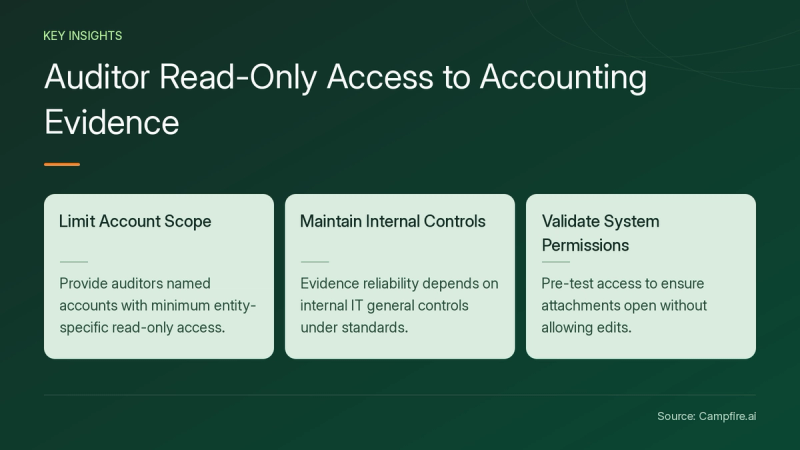
- Give each auditor a named account with the minimum read-only rights, scoped to the entities under audit (CERRIX).
- Practitioners also use exports, screenshots, screen shares and sandboxed copies instead of live access (Spiceworks Community).
- Read-only access does not make evidence reliable by itself. Under PCAOB AS 1105, reliability depends partly on the company's controls, including IT general controls.
- Test the role before auditors arrive. Confirm they can open attachments and cannot edit anything.
What Are the Options for Auditor Access?
There are five common ways to give auditors access, and they differ in how much control you keep. The table below summarizes them from the supplied sources.
| Option | How it works | Trade-off | Source |
|---|---|---|---|
| Named viewer accounts | How it worksOne personal account per auditor, read-only roles, restricted to in-scope organizations | Trade-offAuditors browse live data. Requires role setup and removal. | SourceCERRIX viewer accounts guide |
| Read-only data connection | How it worksAuditors pull risks, controls and test results into their own tools | Trade-offAvoids separate logins. Availability depends on vendor. | SourceCERRIX External Connections overview |
| Exports and reports | How it worksYou provide files that match the auditor's request | Trade-offNo system access. Relies on your extraction. | SourceSpiceworks thread on ERP access |
| Screen share with screenshots | How it worksAuditor watches your session and directs captures | Trade-offNo credentials issued. Slower for large requests. | SourceSpiceworks thread on ERP access |
| Sandbox copy | How it worksA backup loaded into a test environment | Trade-offIsolates production. Needs supervision and setup. | SourceSpiceworks thread on ERP access |
One cybersecurity auditor in the Spiceworks discussion preferred exported documents because they become artifacts showing exactly what the assessment relied on.
Does Read-Only Access Make Evidence Reliable?
No, read-only access protects records from auditor edits, but auditors still evaluate reliability. AS 1105 states that company-produced information is more reliable when the company's controls over it, including IT general controls, are effective. It also says digitized documents depend on controls over their conversion and maintenance.


For external information the company provides in electronic form, AS 1105 paragraph .10A directs auditors to understand how it was received and maintained, and to test whether it was modified. Clean version histories and access permissions help answer those questions. Trullion's buyer guide lists version histories, access permissions and review records as document management features to check.
How Do You Set Up and Verify an Auditor Role?
Set up a scoped, named, read-only role, then test it with a dummy account before fieldwork. Use this walkthrough:
- Agree on scope. List the entities, periods and modules the auditors need.
- Create named accounts. Use personal email addresses, not shared mailboxes (CERRIX).
- Assign minimum rights. Choose viewer roles and restrict them to in-scope organizations. Add reviewer rights only if auditors must sign off on results.
- Check sign-in. SSO policies may block unmanaged external laptops, so confirm whether standard logins are allowed (CERRIX).
- Run verification checks. Using a test account, try to edit a journal entry, delete an attachment and change a setting. Each attempt should fail.
- Confirm visibility. Open a sample invoice, contract and bank statement. Confirm whether the role includes change history or audit logs.
- Set an end date. Schedule access removal when fieldwork closes.
If you are comparing ledgers, turn these checks into vendor questions. Ask each vendor, including Campfire through its Core Accounting page, to demonstrate a read-only role in a live demo.


If auditors prefer pulling data into their own tools, ask vendors how connections are permissioned and logged. Campfire's Integrations page is a starting point for that conversation.
Should You Ever Refuse Direct Access?
You can decline live access and provide reports instead, especially without an access policy. Spiceworks contributors split on this: some said financial auditors often need read access, while others said auditors should receive only vetted reports (Spiceworks). One practitioner advised pushing for policy guidance from leadership if none exists.
Conclusion
Accounting and control systems can often show auditors supporting evidence without edit rights, through scoped viewer roles, read-only connections or exports. Pick the method your auditors need, test the role before fieldwork and remove access afterward. Remember that auditors will still assess your controls over the data. Note: Campfire publishes this article. To evaluate a ledger for your next audit, get started with Campfire.
FAQ
Should each auditor get a separate login?
Yes, CERRIX recommends one personal account per auditor, linked to a personal email address rather than a shared mailbox, so notifications reach the right person and activity is attributable to an individual (CERRIX).
Can auditors use their own laptops?
Often yes for browser-based tools, but sign-in method matters: CERRIX notes that standard logins work from any device, while SSO policies may block unmanaged external laptops, so check with your IT team (CERRIX).
Is a sandbox copy a good alternative to production access?
It can be, and one Spiceworks contributor described loading a database backup into a test environment for auditors, while still supervising them and providing printed or PDF records where possible (Spiceworks).
Do auditors still test data they view in read-only mode?
Yes, under PCAOB AS 1105 auditors evaluate whether company-produced information is accurate and complete, or test the controls over it, regardless of how they access it (PCAOB AS 1105).
Sources
- [c1] Access for External Auditors | CERRIX Documentation — docs.cerrix.com. Accessed November 21, 2026.
- [c2] Should external auditors be given access to the ERP system? - IT & Tech Careers - Spiceworks Community — community.spiceworks.com. Accessed November 21, 2026.
- [c3] AS 1105: Audit Evidence | PCAOB — pcaobus.org. Accessed November 21, 2026.
- [c4] 9 Best Audit Compliance Software Platforms for 2026 — trullion.com. Accessed November 21, 2026.