Version Control for Accounting Automation: A Guide to Rule Changes
Listen to article
8:48
Version control for accounting automation is the practice of recording, approving, testing and reconstructing changes to the rules that automated systems use to post, match and categorize transactions. It answers one question: which approved logic produced a given set of numbers. This guide explains the controls, using a hypothetical mapping change, and it extends the work of the accounting engineer role.

Key Takeaways
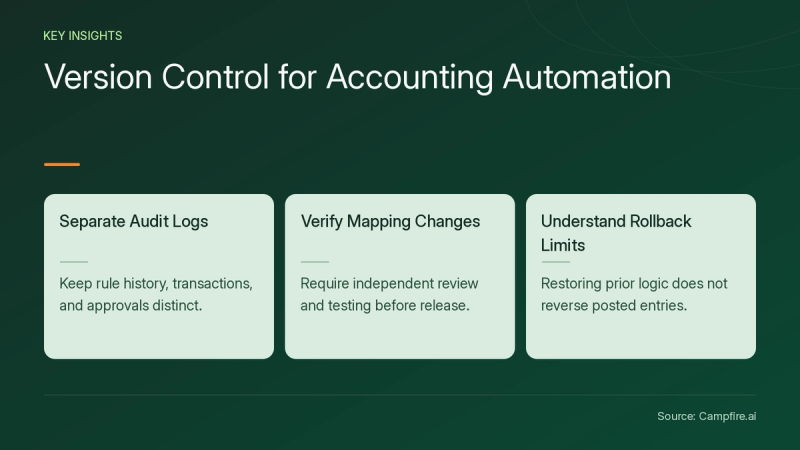
- Separate rule history, transaction audit logs and approval evidence. Each answers a different question.
- Require an independent reviewer and a test release before any mapping change goes live.
- Rollback restores prior logic. It does not reverse entries already posted.
- Retain the rule version, input reference, test results and approver for every close.
- Ask vendors to demonstrate version history, diffs, permissions and rollback live.
What does version control cover in accounting automation?
Version control covers three records that finance teams often blur together. Rule history shows what the logic was. A transaction audit log shows what the system did to a transaction. Approval and deployment evidence shows who authorized the change and when it went live.
| Record | Question it answers | Example evidence | Typical owner |
|---|---|---|---|
| Rule history | Question it answersWhat logic was in force? | Example evidenceVersioned posting map, effective dates, field-level diffs | Typical ownerFinance Systems Manager |
| Transaction audit log | Question it answersWhat did the system do to this transaction? | Example evidenceRule applied, timestamp, before and after values | Typical ownerAccounting team, with controller review |
| Approval and deployment evidence | Question it answersWho approved the change, and when did it go live? | Example evidenceChange request, test results, approver sign-off, release record | Typical ownerController and independent reviewer |
BlackLine's buyer guide cites unversioned spreadsheets, manual reconciliation errors and disconnected data systems as root causes of low confidence in cash flow visibility. It reports that 98% of respondents lack complete confidence in that visibility. BlackLine's buyer guide frames the problem as a control issue, not only a tooling issue.
Campfire's Accounting Intelligence page describes review and audit trails for categorization, matching and duplicate detection. The supplied page does not document versioning of posting rules. Confirm that capability directly in a demo.
How do you control a rule change before it goes live?
Control a change by moving it through a request, an impact check, a test release, an independent approval and a logged deployment. The steps below use a hypothetical change: a revenue mapping that moves add-on subscription revenue to a new deferred revenue sub-account, effective the first day of next month.


- Request: The Finance Systems Manager records the old and new mapping, the effective date and the business reason.
- Impact check: The Controller lists transaction types, open periods and reports that depend on the mapping.
- Test: Run the new version against representative transactions in a test environment. Teams that script test cases can review the Python for accounting automation guide.
- Independent approval: A Controller who did not write the change approves it.
- Deploy: Promote the tested version with a timestamp and a record of who released it.
- Monitor: Review exceptions from the first close after release.
What halts the rollout?
Halt the rollout when source-to-ledger totals for the test set do not tie. Retain the failing output, and require a separate authorization before restoring the prior version.
Assign restoration approval to a person other than the one who fixes the mapping. This separation keeps the fix and the release decision independent.
How do you reconstruct which logic produced a period's numbers?
Reconstruct a period by matching posted entries to the rule version, input reference and effective dates in force on each posting date. Keep the items below for every close, including after a rollback.
| Evidence item | Purpose | Keep after rollback? |
|---|---|---|
| Rule version ID | PurposeIdentifies the logic applied | Keep after rollback?Yes |
| Effective dates | PurposeShows which version governed each date | Keep after rollback?Yes |
| Input snapshot or reference | PurposeShows the source data processed | Keep after rollback?Yes |
| Test results and approver | PurposeShows the change was reviewed before release | Keep after rollback?Yes |
| Exception log | PurposeShows manual overrides and their reasons | Keep after rollback?Yes |
PwC's 2026 report found that 54% of CFOs operate with moderate-to-no standardized accounting data across group entities. The same report found that 34% still extract and load accounting data into spreadsheets that require manual adjustments. Those handoffs are where reconstruction usually fails, so record each one. PwC's 2026 report provides the benchmark for that gap.


Rollback restores the prior logic. Entries already posted stay in the ledger until the Controller approves correcting entries, which need their own review in the closed-period process. Core Accounting's month-end close checklists are one place to record that review step.
What should you ask a vendor during a demo?
Ask vendors to show each control live rather than describe it in a feature list. Score each answer as demonstrated, partial or not available.
| Control | Demo request | Pass evidence |
|---|---|---|
| Configuration history | Demo requestShow a past rule version and its effective dates | Pass evidenceVersioned record with timestamp and author |
| Meaningful diffs | Demo requestChange one mapping and display the difference | Pass evidenceField-level before and after values |
| Access restrictions | Demo requestAttempt an edit as a user without approval rights | Pass evidenceEdit blocked and logged |
| Independent approval | Demo requestSubmit as requester, then approve as a second user | Pass evidenceApproval recorded separately from the request |
| Test-to-production promotion | Demo requestPromote a tested version | Pass evidenceTest results linked to the release |
| Evidence export | Demo requestExport one closed period | Pass evidenceExport includes version, inputs and approver |
| Rollback | Demo requestRoll back one rule | Pass evidenceLogic restored, and posted entries flagged rather than changed |
Campfire's Ember AI page states that accountants review and approve proposed actions. That supports an approval step, but it does not show rule versioning. Run the full scorecard before relying on any product for these controls.
Conclusion
Version control for accounting automation separates rule history, audit logs and approval evidence. Each change should pass request, testing, independent approval and logged deployment before it touches a close. Keep the rule version, inputs and approver for every period, and treat rollback as a logic change, not a correction.
Start by mapping one spreadsheet handoff this month and listing which approvals it currently lacks. To see how these controls work in practice, get started with Campfire.
FAQ
What is version control for accounting automation?
Version control for accounting automation is the process of recording, approving, testing and reconstructing changes to the rules that automated systems use to post and classify transactions. It includes a versioned rule history, a transaction audit log and evidence of who approved and deployed each change.
Is a transaction audit log enough to prove which rule was used?
No. A transaction audit log shows what happened to a specific transaction, but it does not show whether the rule was approved, tested or in force for that period. Pair it with rule version history and approval records.
Does rolling back a rule reverse posted entries?
No. Rollback restores the prior logic, but entries already posted remain in the ledger. The Controller must decide whether correcting entries are needed, and those entries need their own approval.
Sources
- [c1] blackline.com — pages.blackline.com. Accessed November 25, 2026.
- [c2] pwc.com — pwc.com. Accessed November 25, 2026.