Forecast Scenario Versioning: Snapshots, Approvals and Audit Trails
Listen to article
7:14
Forecast scenario versioning is the practice of testing alternative forecasts against a frozen baseline while keeping every approved version retrievable. The baseline stays unchanged, each scenario lives on its own branch, and each change has an owner and an approval record. Within the finance engineer role, this control is what keeps scenario work reliable. In the 2025 FP&A Trends survey, 51% of respondents could run scenarios within a week, so speed is achievable only when the process is repeatable.

Key Takeaways
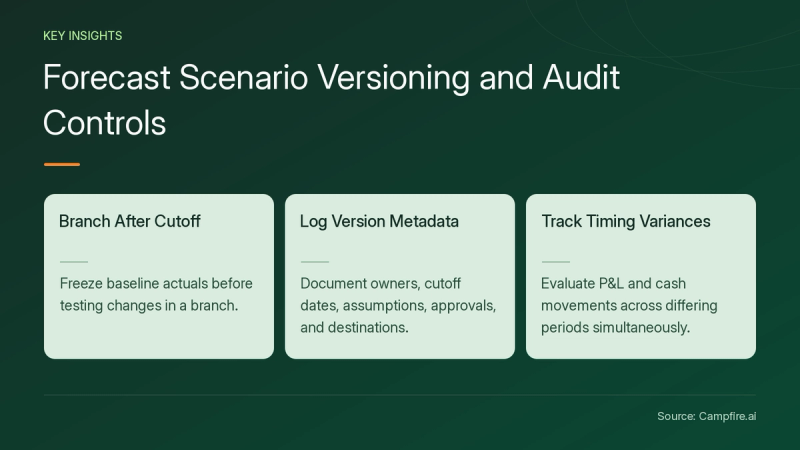
- An official forecast is the approved view, a scenario is a branch that tests changes, and a snapshot is a locked, dated copy.
- Freeze the baseline after the actuals cutoff, then make all changes in a branch.
- Record the owner, cutoff, changed assumptions, approval and downstream destination for every version.
- Compare P&L and cash effects together, since they often land in different periods.
- Confirm the baseline restores exactly before publishing any scenario output.
What is the difference between a forecast version, a scenario and a snapshot?
A forecast version is the approved state of the plan, a scenario is a branch built to test assumptions, and a snapshot is a read-only record of a forecast at a point in time. Only the scenario branch should accept assumption changes. Platform labels vary, so define these three terms in your own process before you configure any tool.
| Term | Purpose | Can it change? |
|---|---|---|
| Official forecast | PurposeCurrent approved plan | Can it change?Only through a new approved version |
| Scenario branch | PurposeTests changed assumptions against the baseline | Can it change?Yes, inside the branch only |
| Snapshot | PurposeLocked record with an ID and timestamp | Can it change?No |
Snapshots matter because planning horizons are short. Pigment's Q2 2026 CFO Index found that 54% of surveyed finance teams did not plan beyond six months, so comparable records must survive each roll-forward.
How do you branch a scenario without overwriting the baseline?
Create a branch that links to the frozen baseline ID, then change only the assumptions listed in one input table. Grant Thornton's Q2 2025 CFO survey reported that 42% of CFOs conducted high-frequency, proactive scenario planning, which makes a repeatable branching method valuable.
- Freeze the baseline and record its snapshot ID and actuals cutoff.
- Name the branch after its assumption, such as 'Hiring delay, 2 months'.
- Change inputs in the assumption table only, never in output cells.
- Compare outputs against the baseline line by line.
- Submit for review. Approved outcomes become a new official version.
How do you reconcile actuals before freezing a forecast?
Tie the actuals in the baseline to the general ledger through a stated close date, and freeze only after any difference is zero or explained. Gartner's 2025 finance AI survey named data quality and availability among the largest adoption obstacles, so check inputs before accepting any automated assumption. Campfire's Core Accounting page lists general ledger, journal entries and month-end close checklists, so evaluators should confirm the same tie-out steps in a demo.


The following example is hypothetical. All figures are illustrative.
| Measure | Baseline | Hiring delay branch | Difference |
|---|---|---|---|
| Payroll expense, Mar to Jun (3 hires at $12,000 per month each) | Baseline$144,000 | Hiring delay branch$72,000 | Difference-$72,000 |
| Cash paid, Apr to Jul (paid one month in arrears) | Baseline$144,000 | Hiring delay branch$72,000 | Difference-$72,000 |
| Cash paid in April | Baseline$36,000 | Hiring delay branch$0 | Difference-$36,000 |
The reviewer should confirm the start-date change and check April and May cash against the liquidity forecast. The baseline values must remain unchanged after the decision.
What should a version control record contain?
Each version needs a record that names the owner, cutoff, changed assumptions, reviewer and destination. Without these fields, a reviewer cannot tell which numbers were approved or why they changed. Use broad role titles, such as Finance Lead for approval and Finance Systems Manager for model review.


| Field | Illustrative entry |
|---|---|
| Version name | Illustrative entryBaseline, current quarter, official |
| Snapshot ID and timestamp | Illustrative entryExample ID with extract date and time |
| Owner | Illustrative entryFinance Lead |
| Actuals cutoff | Illustrative entryLedger tie-out through the stated close date |
| Changed assumptions | Illustrative entryStart date for three hires moved two months |
| Model revision | Illustrative entryFormula version identifier |
| Reviewer and status | Illustrative entryFinance Systems Manager, approved or rejected |
| Downstream destination | Illustrative entryNamed reporting view |
Pair this record with financial planning model validation tests to check formulas before approval.
How should approved multi-year plans stay usable?
Keep each approved fiscal-year plan as its own locked snapshot, then select the applicable plan by period in the reporting layer. Copying values into one consolidated reporting version makes later corrections harder to reconcile. For the mapping logic, review mapping actuals to planning dimensions.
| Reporting period | Plan selected | Storage rule |
|---|---|---|
| Jan to Mar, current fiscal year | Plan selectedApproved plan, version 1 | Storage ruleLocked snapshot, unchanged |
| Apr to Dec, current fiscal year | Plan selectedApproved plan, version 2 | Storage ruleLocked snapshot, unchanged |
| Prior fiscal year | Plan selectedApproved prior-year plan | Storage ruleRetained, read-only |
Conclusion
Forecast scenario versioning works when the baseline stays fixed and every change leaves a record. Define the three terms, reconcile actuals before each freeze, and require a reviewer to confirm the baseline restores exactly. Start by drafting the version record for your next cycle, then test one branch end to end. Teams that want ledger tie-out and close workflows in one system can get started with Campfire.
FAQ
What is the difference between a forecast version and a scenario?
A forecast version is the approved current plan, while a scenario is a separate branch that tests changed assumptions against that plan. Only the approved version should be used for official reporting. Scenario results should move into the official forecast only through a new approved version.
Should a snapshot ever be edited?
No. A snapshot is a record of what was forecast at a specific time, so editing it removes the audit trail. If a correction is needed, create a new version that references the original snapshot and explains the difference.
Does forecast scenario versioning require specialized software?
No. A spreadsheet can hold the baseline, the branches and a change log if the baseline is locked and each change is reviewed. Software mainly helps by enforcing locks, timestamps and approvals automatically.
Sources
- [c1] fpa-trends.com — fpa-trends.com. Accessed November 28, 2026.
- Pigment's Q2 2026 CFO Index — pigment.com.
- Grant Thornton's Q2 2025 CFO survey — grantthornton.com.
- Gartner's 2025 finance AI survey — gartner.com.